

A locksmith in Denver spends $2,000 a month on Google Ads because his website generates zero calls on its own. When he finally checks, the problem is obvious. A stray line in his robots.txt was blocking Google from crawling half his service pages. Google Search Console had flagged it for eight months. That’s the kind of leak an SEO audit for small business exists to catch. This guide walks you through what to check, which tools to use, how to prioritize fixes, and when to bring in help.

What a complete SEO audit covers (technical, on-page, content, links)
A full SEO audit inspects four layers. Skipping any one leaves a blind spot that can suppress your entire site. The technical layer covers how search engines crawl and index your pages: HTTPS, mobile-friendliness, site speed, sitemaps, and robots.txt. The on-page layer looks at metadata, headings, keyword targeting, and whether each page answers the search intent behind the query. The content layer judges content quality. Is a page thin, outdated, or duplicated, and does it earn the ranking it’s chasing? The off-page layer reviews backlinks, local citations, and other authority signals.
A proper SEO website audit connects all four. A fast, technically clean site with weak content won’t rank. Brilliant content trapped on an unindexable page never gets seen. Google’s own Search Essentials documentation lays out the technical and quality baselines every site is measured against. For a plain-English primer on the basics, Google’s SEO Starter Guide is the reference point any honest SEO analysis starts from. The goal isn’t a 200-item report. It’s finding the handful of SEO issues costing you search visibility.
Technical SEO checks (crawlability, indexing, site speed, page experience)
Technical SEO is where most small business sites quietly lose ground. Start with crawl and index status. Open Google Search Console, check the Pages report, and confirm your important URLs are indexed rather than “excluded” or “blocked by robots.txt.”
Next, test site speed. Run your key pages through Google’s PageSpeed Insights and aim for a load under three seconds on mobile. Page experience signals, including Core Web Vitals, feed directly into how Google evaluates your pages against competitors. Many owners assume a slow site is just annoying. In reality, a site that takes six seconds to load can lose both visitors and ranking position at once.
Then confirm the fundamentals. HTTPS is active, the site is mobile-responsive, an XML sitemap is submitted, and structured data is present where it helps (products, reviews, local business info). Getting these right from the start is far easier when you’re integrating SEO into website development rather than retrofitting later. These technical SEO checks are unglamorous, but they’re the foundation everything else in the SEO website audit sits on.
On-page and content quality review (metadata, keywords, search intent)
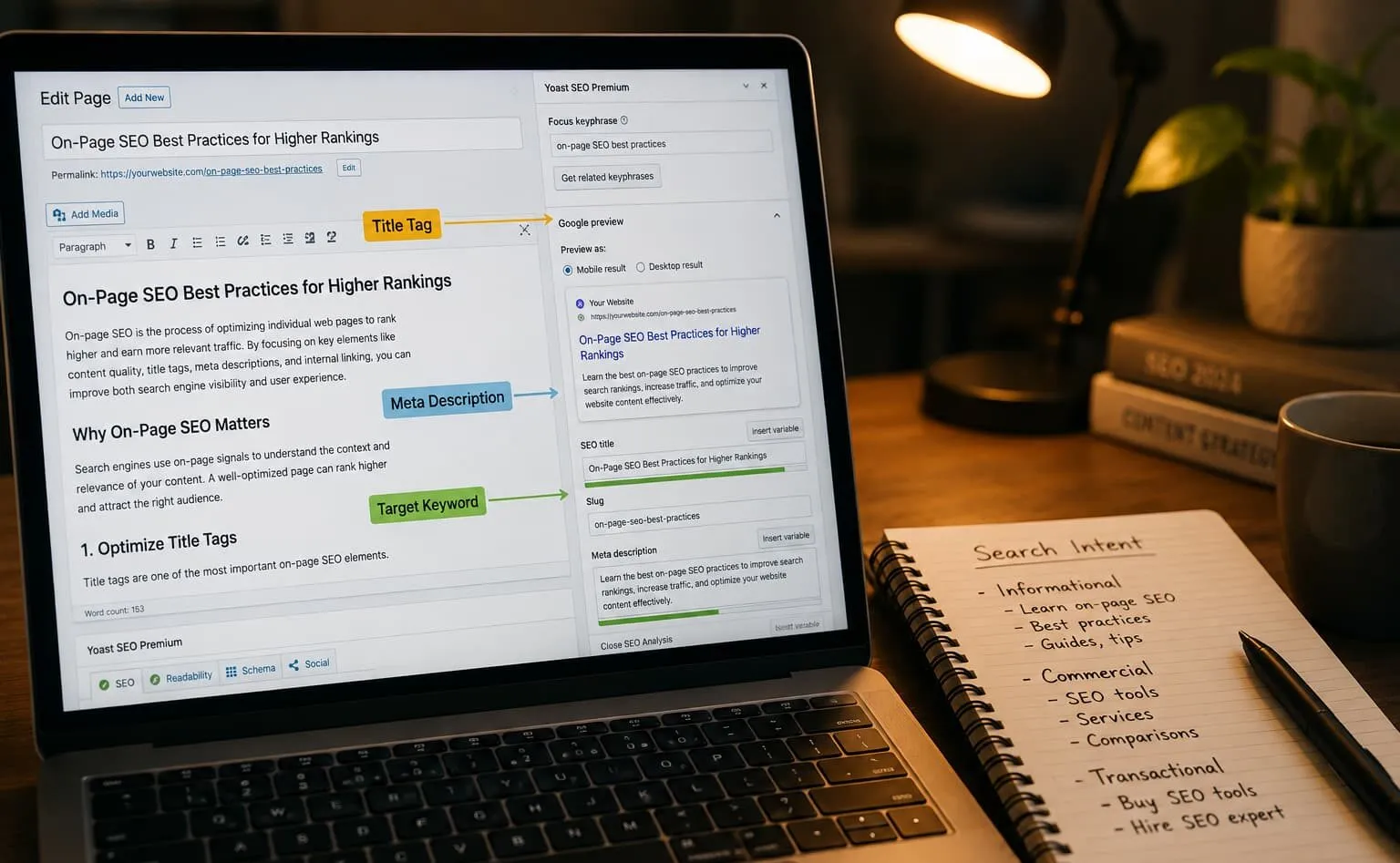
On-page SEO is where you control the message search engines and readers receive. Go page by page and check the basics first. Does each page have a unique title tag and meta description, one clear H1, and metadata that describes what the page actually delivers?
Then move to search intent, the part most DIY audits skip. Solid keyword research tells you what people type. Matching search intent tells you what they expect to find. A page targeting “emergency plumber near me” should load with a phone number and service area, not a 2,000-word history of plumbing. When intent and content quality line up, rankings and conversions can rise together.
Look at the content itself with a skeptical eye. Is it thin, padded, or useful? Are you internal linking related pages so authority flows to your money pages, and so Google understands your site structure? Internal linking is one of the most undervalued levers in any SEO analysis. If you run WordPress, WordPress SEO plugins can surface missing metadata and orphaned pages quickly. For more tactics, these small business SEO tips that drive leads go beyond the mechanics. The judgment about intent and quality is still yours.
Local SEO and Google Business Profile checks
For a business that serves a specific area, a local SEO audit often moves the needle faster than anything on the main website. Start with your Google Business Profile. Is it claimed, fully filled out, and categorized correctly? Are your hours, phone number, and service areas accurate, and do you have recent photos and posts? An incomplete profile is one of the most common reasons local businesses miss the map pack, and a big part of why your business isn’t showing up on Google in the first place.
Next, audit consistency. Your name, address, and phone number should match exactly across your website, Google Business Profile, and every directory listing. Inconsistent local citations confuse search engines and dilute trust, because when the signals about your business don’t agree, Google can’t confidently attach your listing to a search. Pull your listings from the major data aggregators and fix mismatches.
Then look at online reviews: quantity, recency, star rating, and whether you respond. Reviews influence both rankings and the click decision a customer makes. A local SEO audit that ends here is incomplete. Check whether your service pages target the city and neighborhood terms your customers actually search. A deeper dive into local SEO for small businesses shows how aligning local citations and your Google Business Profile is often the shortest path to the organic growth a service business needs. If juggling profile management and citation cleanup is more than you have time for, Vineet Kukreti handles local SEO and Google Business Profile optimization as a done-for-you service.
Authority is the vote of confidence other sites give yours. It’s why two pages with identical content can rank pages apart. Start by pulling your backlink profile with a tool like Ahrefs, Semrush, or the free Backlink report inside Google Search Console. You’re looking for three things: how many linking domains you have, whether those links come from relevant, reputable sites, and whether any spammy or toxic links need disavowing.
Quality beats quantity here. A handful of backlinks from respected industry sites can outweigh many from a link farm. Google weighs the trust and relevance of the linking site, not the raw count. Many small business owners assume more links always help. In reality, a pile of low-quality links can actively drag you down.
Round out the authority review with your local citations and directory listings, since those double as trust signals for local search. Then do a quick competitor analysis. Pull the backlink profiles of the two or three businesses outranking you and note where their links come from. That gap analysis is often the most practical output of the whole review. It shows exactly which sites and content types earn links in your market.
SEO audit tools for small businesses (free and paid)
You don’t need an expensive stack to run a solid audit. The free tier alone covers most of what a small business needs. Google Search Console shows indexing, queries, and crawl errors. Google Analytics tracks behavior and conversions. PageSpeed Insights measures site speed and page experience. Google’s Rich Results Test validates structured data. Together, these give you a genuine free SEO report from the one source that matters most: Google. If you want a broader rundown, this guide to the best SEO tools for small business owners compares the options.
When you outgrow the free SEO audit tools, paid platforms add depth. SEMrush and Ahrefs run a full SEO website audit, crawling your whole site, flagging technical SEO issues, and layering in rankings analysis, keyword research, and competitor analysis. Screaming Frog’s crawler is excellent for technical work and is free up to 500 URLs. Many of these double as an SEO analyzer that scores your site and lists actionable recommendations in priority order.
Here’s the honest trade-off. Paid tools save time and surface issues you’d miss by hand, but starting around $139/month, they’re overkill for a single check. Start free, and upgrade only when the data justifies it.

How to prioritize and fix issues after the audit
A finished audit that isn’t prioritized is just a longer to-do list. Sort every finding by two factors: impact on search visibility and effort to fix. Handle high-impact, low-effort items first, then work down. Here’s a workable order:
- Fix anything blocking crawl and index (robots.txt errors, noindex tags, broken sitemaps) since these can hide entire pages from Google.
- Restore security and mobile basics: enable HTTPS and confirm the site is mobile-responsive.
- Improve site speed on your highest-traffic and highest-intent pages toward that sub-three-second target.
- Repair on-page SEO: rewrite duplicate or missing metadata and align thin pages to search intent.
- Strengthen internal linking so authority reaches your priority pages.
- Address backlinks and local citations: clean up toxic links and correct inconsistent listings.
Consider an owner who runs a solid SEO audit for a small business, then changes fifty things across the site in one afternoon. Rankings shift the next week, but with everything touched at once, there’s no way to tell which fix helped and which hurt. Fix one category, verify it in Google Search Console, then move on. That guessing game slows your organic growth.
AI search and GEO visibility checks in a modern audit
Search doesn’t end at the ten blue links anymore. Google’s AI Overviews, ChatGPT, and Perplexity now answer questions directly, and a modern seo audit for small business has to account for that. This is where generative engine optimization comes in: optimizing so AI systems can find, understand, and cite your content.
Check your AI search visibility by asking the tools your customers use. Prompt ChatGPT and Google’s AI features with questions in your niche and see whether your business gets mentioned. If competitors show up and you don’t, that’s a visibility gap worth closing.
What actually earns AI citations is clarity and structure. Clear headings, direct answers near the top of the page, structured data, and content that resolves a question all help AI systems parse and quote you. The overlap with good SEO is large, which is the reassuring part. Strong technical health, useful content, and clean metadata serve both traditional rankings and ai search visibility. Adding an AI search and brand-mention check to your audit costs little and helps future-proof your search visibility.
DIY audit vs hiring a freelance SEO consultant
You can absolutely run a capable audit yourself. If you’re comfortable in Google Search Console and willing to learn, you should. Budget 3 to 5 hours per audit, plus quarterly re-checks, so 12 to 20 hours a year before you fix a single thing. That’s the real cost of DIY: your time, and the risk of misreading a technical signal.
The judgment gap is where most owners get stuck. Tools spit out hundreds of SEO issues, but knowing which three matter and which are noise takes experience. A common pattern: an owner spends a weekend fixing dozens of “errors” a tool flagged, none of which touched the real problem, while the page blocked in robots.txt stays invisible for another quarter.
That’s when a freelance seo consultant earns their fee. A good consultant does the rankings analysis, prioritizes the fixes by business outcomes, and can execute them too, so you’re not left with a report and no path forward. If you’d rather talk through your findings with a specialist, you can book an SEO consultation to get expert eyes on the list. They deliver actionable recommendations tied to leads, not a raw error dump. Results vary based on competition, website condition, industry factors, and implementation. Still, the value of an experienced eye is separating the vital few fixes from the trivial many.

A well-run SEO audit for small business only pays off when someone reads the list correctly. If you’ve run yours and you’re staring at a list of seo issues without knowing which ones actually cost you leads, a second opinion can pay for itself. Vineet Kukreti works with a small number of clients directly, so you get a strategist who explains the findings in plain English and ties every recommendation to real business outcomes. Get a straight-talking SEO review of your site and find out where your visibility is leaking.
FAQs
Q1. What does an SEO audit for a small business actually check?
A1.
It evaluates three areas: technical health (site speed, mobile responsiveness, crawlability), on-page factors (title tags, meta descriptions, content relevance), and off-page signals (backlink profile and domain authority). The goal is to find what’s blocking your site from ranking and generating leads.
Q2. Can I just use ChatGPT to run an SEO audit myself?
A2.
ChatGPT can explain concepts and interpret data you feed it, but it can’t crawl your site, measure page speed, or pull your live backlink profile on its own. You still need tools like Google Search Console, PageSpeed Insights, and a crawler to gather the actual data.
Q3. Is paying for an SEO audit worth it, or should I do it myself?
A3.
A DIY audit is realistic if you understand SEO basics, but it takes roughly 3-5 hours per audit and 12-20 hours a year with quarterly re-checks, not counting the fixes. Paying makes sense when your time is scarce or when the issues found are technical enough that misreading them wastes months of lost visibility.
Q4. What should a small business SEO audit checklist include?
A4.
At minimum: HTTPS security, mobile-friendliness, page speed under 3 seconds, a submitted XML sitemap, a correctly configured robots.txt, indexing status in Google Search Console, and on-page elements like title tags and content aligned to search intent. Skipping the technical layer is the most common reason DIY audits miss the real problem.
Q5. Which tool is best for auditing a small business website?
A5.
SEMrush’s Site Audit flags 140+ technical and on-page issues with prioritized fixes but starts around $139.95/month, which is steep for a one-off check. For most small businesses, free tools like Google Search Console and PageSpeed Insights cover the essentials before you commit to a paid platform.
Q6. How do I actually run the audit step by step?
A6.
Start by verifying your site in Google Search Console and installing Google Analytics, then check technical items (HTTPS, mobile, speed, crawlability, sitemap), review on-page factors page by page, and finish with your backlink profile. Prioritize fixes by impact, not by how many issues a tool reports.
Q7. What happens if I never audit my site at all?
A7.
Undetected issues like blocked pages in robots.txt, slow load times, or missing HTTPS can quietly suppress your rankings for months while you keep paying for ads to compensate. An audit catches the visibility leaks before they cost you qualified leads you’ll never know you missed.

Vineet Kukreti is an experienced SEO and project management expert with over 10 years of success helping small businesses grow. He has led SEO campaigns that improved Google rankings, increased website traffic, and strengthened local visibility. As a project manager, Vineet brings structure and efficiency to digital operations, ensuring smooth execution and measurable results. His combined expertise in SEO and business operations makes him a trusted partner for growth-focused businesses.