

A business redesigned its website over a weekend, launched Monday morning, and watched organic traffic fall 60% by Thursday. The cause wasn’t the new design. It was a robots.txt file carried over from the staging server, still telling Google to stay out. This is the kind of thing a real SEO site migration checklist catches before launch, and it’s exactly what rushed teams skip. The sections below walk through what a migration actually involves, where rankings leak, and the specific steps that separate a clean move from a traffic disaster.
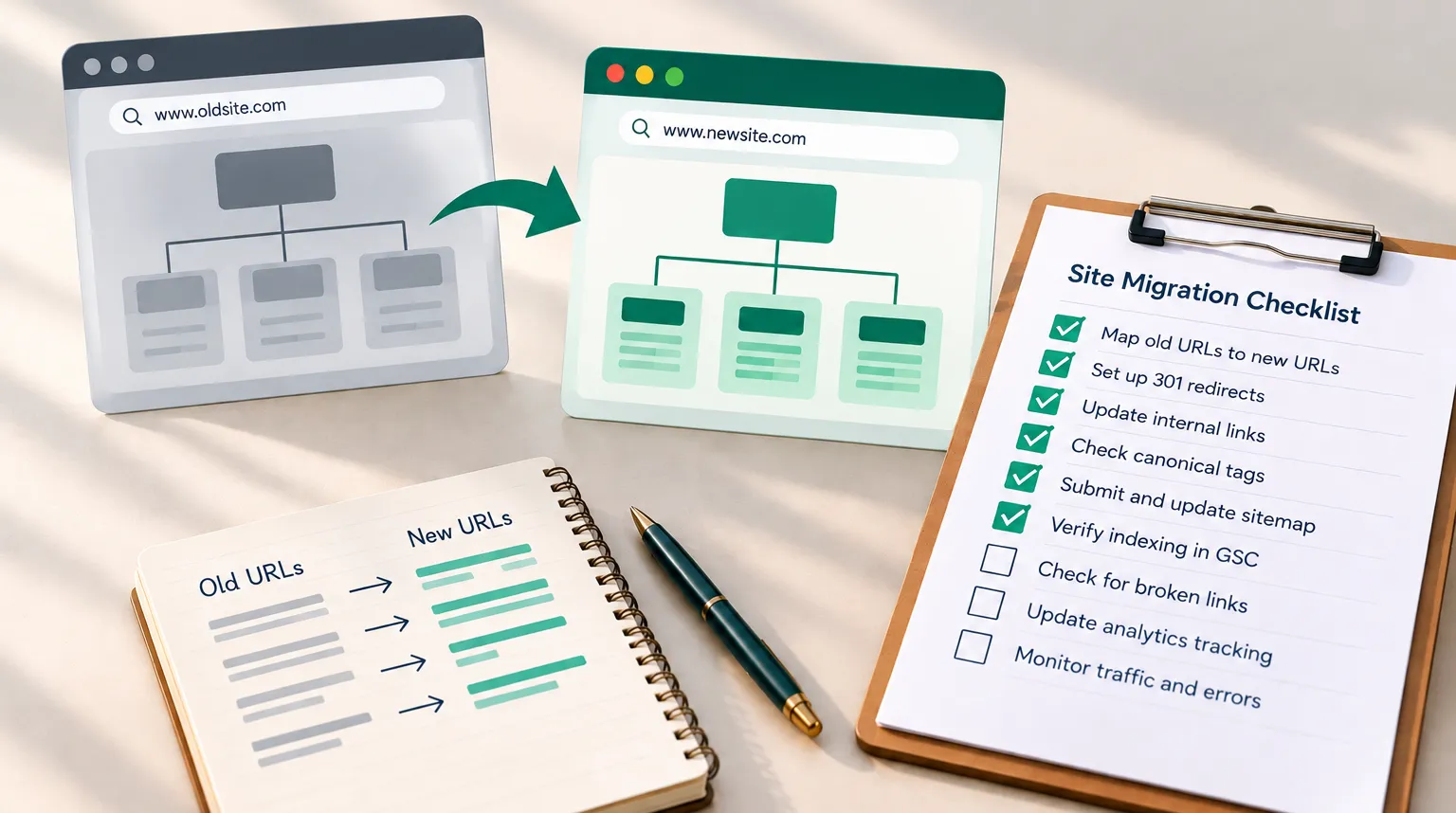
What is a website migration and its common types
A website migration is any significant change to your site that affects how search engines find, crawl, and understand it. It covers more ground than most people expect, and it isn’t just moving to a new server.
Common types of website migrations include:
- Domain name change: moving from oldbrand.com to newbrand.com, which forces Google to re-associate all your authority with a new address.
- Protocol change (http to https): switching to a secure connection, typically a lower-risk migration when done cleanly.
- URL structure change: reorganizing paths, like moving /blog-post to /guides/blog-post.
- Content management system change: moving from, say, Wix to WordPress, which often changes URLs and page templates at once.
- Website redesign: a visual and structural overhaul that frequently alters site structure and internal linking.
Google’s own guide to site moves and migrations breaks these down and explains how the search engine processes each one. For a deeper technical breakdown, Google’s official guidance on site moves with URL changes covers exactly how signals transfer between old and new URLs. The type matters because each one changes a different set of signals, and your website migration checklist has to account for whichever ones are in play. If your site is already underperforming before you even consider a migration, it’s worth running a local SEO audit to find what’s hurting your rankings first, so you’re not carrying existing problems into the new site.
What an SEO migration is and why SEO must be part of it
An SEO migration is a site migration planned and executed with search visibility treated as a primary outcome, not an afterthought. The difference comes down to who’s in the room when decisions get made.
Picture a retailer that hands a redesign entirely to a design agency. The agency builds a new site, picks cleaner URLs, and launches. Weeks later, the business sees a steep drop in organic traffic and inbound calls slow down. The design itself wasn’t the issue. Nobody mapped the old URLs to the new ones, so pages that used to rank now return a 404.
Here’s what actually happens: rankings attach to specific URLs, not to your brand in the abstract. Move or delete a URL without a redirect, and the ranking and backlinks pointing to it disappear. That’s why seo migration can’t get bolted on at the end. Search Engine Journal’s guide to website migrations makes the same point: the SEO work has to start during planning, not after launch. A redesign with no migration plan, and no pre-launch SEO review, is one of the fastest ways to lose rankings you already earned. Working through a website redesign SEO checklist before design work even starts is one way to keep SEO from becoming an afterthought.
How migrations affect SEO and the risks of getting it wrong
Every migration temporarily disrupts how Google understands your site. Done well, the dip tends to be small and short-lived. Done badly, it can be steep and slow to recover.
The main migration risks:
- Lost rankings: unredirected URLs drop out of the index, taking their positions with them.
- Lost backlink equity: links pointing to old URLs stop passing value if those URLs 404 instead of redirecting.
- Crawl confusion: a changed site structure with broken internal links slows how fast Google re-indexes your new pages.
- Indexing gaps: leftover noindex tags or a blocking robots.txt can hide the entire new site.
The root cause of most SEO issues during migration isn’t technical complexity. It’s that nobody owned the SEO side of the project. A common pattern: teams treat the launch date as the finish line, then discover the real work (monitoring, fixing redirects, reclaiming links) hadn’t even started. The consequences show up as lost qualified leads, not just traffic graphs. For a service business living on local phone calls, a period of suppressed search visibility can mean inquiries that never arrive.

Planning the migration and picking a smart launch date
Planning the migration is where most of the actual SEO protection happens. The pre-launch work you do before anyone touches the live site determines whether the move is boring or painful.
Start by defining scope. Are you doing a domain name change, a content management system switch, a URL structure change, or several at once? Write it down. Combining too many changes at once is a mistake we’ll return to.
Then pick a migration date deliberately:
- Avoid your busiest season. An e-commerce site shouldn’t migrate in late November.
- Pick a low-traffic window so a dip hurts less and gives you room to fix issues.
- Launch early in the week, not Friday afternoon, so your team is around to monitor and respond.
- Build buffer time into the schedule for test-crawl results and fixes.
Set a realistic migration project length. A simple http to https move might take a couple of weeks end to end. A full website redesign with a new CMS can run two to three months once you include planning, staging, and post-launch monitoring. Rushing this timeline to hit an arbitrary date is how redirect maps get cut short. It’s also how the seo migration cost quietly grows once fixes are needed after launch instead of before it. For migrations with a lot of moving parts, bringing in dedicated website project management services keeps the SEO workstream from getting squeezed out when design or development deadlines slip.
Pre-migration prep: backups, benchmarks, and crawling the old site
Before you change anything, capture what currently exists. Skip this step and you have no way to prove whether the migration helped or hurt.
First, back up your site. A full backup of files and database gives you a rollback option if launch day goes sideways. Back up your site before anyone edits the live environment, not during.
Next, set benchmarks you’ll measure against later. Record these numbers now, because you can’t compare against data you never captured:
- Current organic traffic by landing page (from Google Analytics)
- Keyword rankings for your important terms
- Indexed page count and impressions in Google Search Console
- Your current backlink profile
- Core Web Vitals and page speed
Then crawl your old site. Use a tool like Screaming Frog to export every URL, title tag, meta description, status code, and internal link. This crawl is the raw material for your redirect map, and it also catches orphaned pages and stray parameters you’d otherwise forget. Save the export. You’ll compare it against the new site after launch to confirm nothing important went missing.
URL mapping and setting up 301 redirects
This is the core of any serious SEO site migration checklist. If URLs are changing, URL mapping is the single document that preserves your rankings.
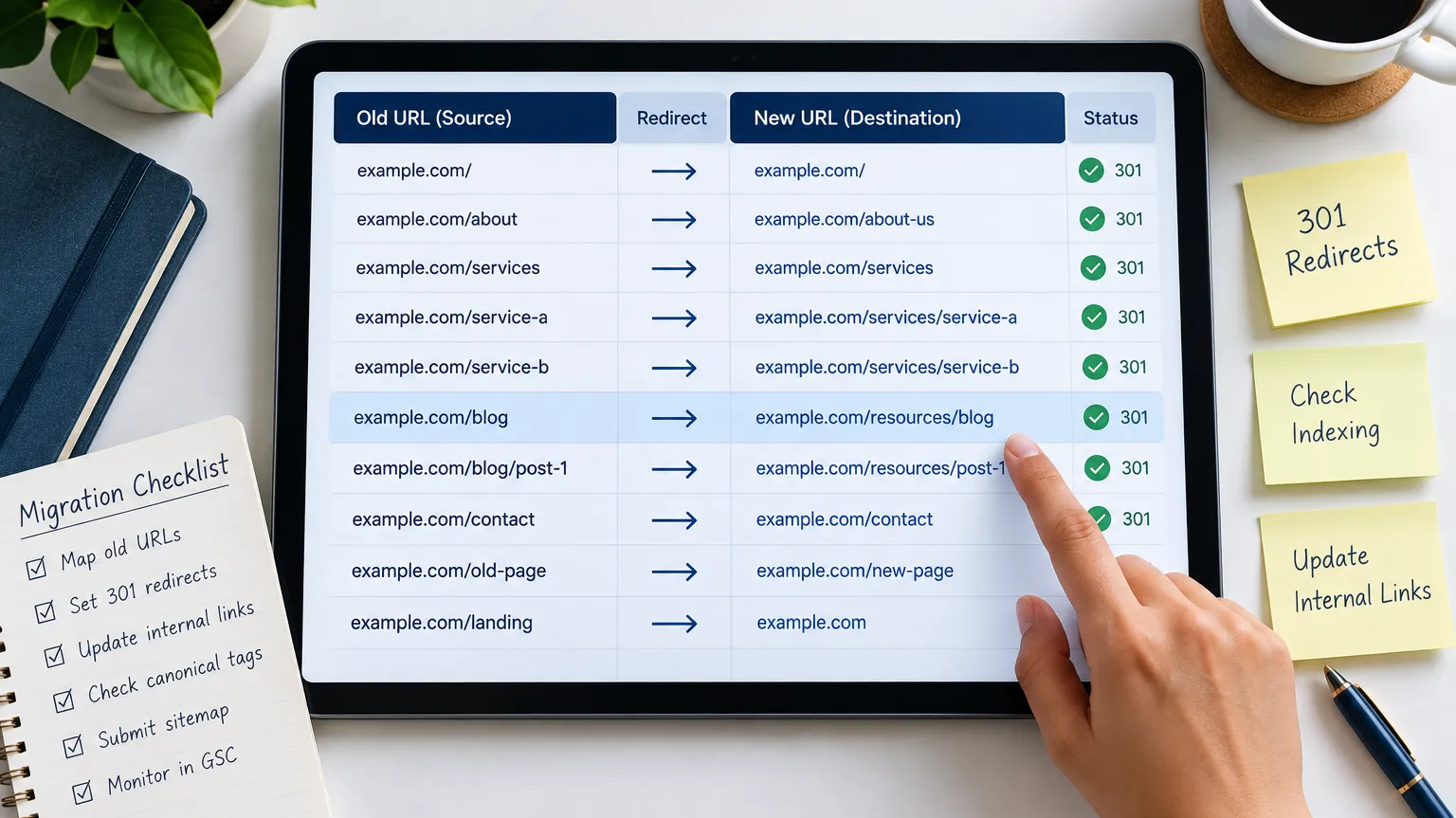
URL mapping means matching every old URL to its closest equivalent new URL, one to one. Open your old-site crawl export, add a column for the new URL, and fill in every row. No gaps.
Then implement 301 redirects based on that map. A 301 tells Google the page moved permanently and passes most of its ranking signals to the new URL. For the technical specifics of how to set these up correctly, Google’s documentation on using 301 redirects correctly is worth reviewing before implementation. Keep these rules in mind:
- One-to-one, not one-to-many. Don’t redirect twenty old pages to the homepage. Google reads that as a soft 404 and the ranking gets lost.
- Avoid redirect chains. The old URL should point directly to the final new URL, not hop through two or three stops.
- Redirect to relevant pages. Match content to content, not just to hit a deadline.
- Include every URL, even low-traffic ones, because they may hold backlinks.
A partial map, built on the assumption that only top pages matter, is a common reason traffic drops harder than expected. Every unredirected URL is a dropped link and a lost ranking.
Building and testing a staging site before launch
A staging website is a private, pre-launch copy of your new site where you test everything before the public sees it. Never test on the live site. Build and verify on staging first.
The critical rule for any staging website: block it from search engines while you build, but remember to unblock it at launch. Leftover noindex tags and a blocking robots.txt carried from staging are two of the most common ways a new site vanishes from search.
Run a test-crawl of the staging site and check:
- Redirects fire correctly: spot-check a sample of old URLs and confirm they land on the right new pages with a single 301 hop.
- No broken internal links across the new site structure.
- Metadata transferred: titles, descriptions, and canonical tags are intact.
- Schema and structured data still render.
- Core Web Vitals and user experience hold up on mobile.
Staging matters because it’s the only place you can catch a bad robots.txt or a missing redirect before real users and Googlebot see it. Fixing a problem pre-launch is typically fast and low-cost. Fixing the same problem after launch can cost rankings and days of recovery. Running through a full technical SEO checklist at this stage catches issues that a casual visual review would miss. Treat the staging sign-off as a hard gate, not a formality.
Launch day execution steps
Launch day is execution, not discovery. If you planned well, this is a checklist you run, not a day you improvise. Keep the window short and the team watching.
Run these steps in order:
- Take a final backup of the old live site so you can roll back.
- Push the new site live and point DNS if the domain is changing.
- Remove staging blocks: delete the noindex tags and fix robots.txt to allow crawling.
- Verify 301 redirects are live by testing a sample of old URLs immediately.
- Submit the new XML sitemap in Google Search Console.
- Use the Change of Address tool in Google Search Console if you did a domain name change.
- Check the robots.txt one more time to confirm nothing is blocked.
- Spot-check key pages for correct content, metadata, and load.
If you changed from http to https or moved domains, confirm the secure version and the new domain both resolve and redirect properly. The first hour after going live is when problems are typically cheapest to catch. Keep someone on monitoring for the rest of the day.
Post-migration monitoring and link reclamation
The migration isn’t finished at launch. Post-launch is where you confirm the move actually preserved value, and where you fix the gaps your plan missed.
For the first few weeks, monitor your website closely. In Google Search Console, watch crawl stats, coverage reports, and the new sitemap’s indexed count. Watch for 404 spikes, redirect errors, and pages dropping out of the index. Monitor your website daily at first, then weekly.
Then handle link reclamation. Even with a solid redirect map, some external sites link to pages that no longer map cleanly. Link reclamation means:
- Pulling your backlink report and checking which linked URLs now 404 or chain.
- Adding direct 301 redirects for any valuable linked URLs you missed.
- For your highest-value links, reaching out to ask the referring site to update the link to the new URL.
A direct link passes more value than a redirected one, and chained redirects slowly leak equity. That’s why link reclamation matters. Compare indexed pages and search engine rankings against your pre-migration baseline at 30 and 60 days. That comparison, not the launch itself, tells you whether the migration worked.

What teams commonly skip or overlook during migration
Even careful teams miss the same handful of things. These are the quiet gaps that turn a clean migration into a slow bleed.
What teams skip:
- Updating the Google Business Profile: a domain name change means your Google Business Profile still points to the old URL, hurting local search visibility and nap consistency across directories and citations.
- NAP consistency checks: business name, address, and phone details drift across listings when the site URL changes.
- AI search visibility: tools now cite your pages in ChatGPT, Perplexity, and Google AI answers. If URLs change without redirects, your ai search visibility can drop alongside classic rankings. Checking how AI tools see your new URLs is worth adding to the list.
- Internal link updates: old internal links still point to pre-migration URLs, forcing unnecessary redirect hops.
- Image and PDF redirects: these hold rankings and links too, and get forgotten.
- Canonical tags: leftover canonicals pointing at old or staging URLs confuse indexing.
The technical SEO details are where migrations quietly fail. Each one on its own seems minor. Together, they explain why some sites struggle to fully recover their search visibility or organic traffic.
If your migration touched the domain, the URL structure, or your content management system and traffic hasn’t returned to its pre-migration baseline, the gap is often fixable once you find it. A focused SEO migration review can help pinpoint missing redirects or indexing blocks before more organic traffic and qualified leads slip away. If you’d rather have a second set of eyes on it, you can get a strategic migration review with Vineet Kukreti to find out where value may be leaking and what to fix first.
FAQs
Q1. What should be on an SEO site migration checklist before launch?
A1.
Before launch, benchmark current rankings, organic traffic, backlinks, and Core Web Vitals, then crawl the old site to export every URL, metadata field, and internal link. Build a one-to-one redirect map matching each old URL to its closest new equivalent, this single document prevents most post-migration traffic loss.
Q2. Why did my traffic drop after migrating my site?
A2.
The most common causes are missing or chained 301 redirects, staging noindex tags left live, or a robots.txt still blocking crawlers. Google treats unredirected old URLs as gone, which drops both rankings and the backlink equity pointing to them.
Q3. How long until rankings recover after a migration?
A3.
A clean HTTP-to-HTTPS migration on the same URLs typically recovers in 2-4 weeks, while a URL restructure or CMS change on the same domain takes 4-8 weeks. Domain changes or combined migrations (new domain plus new CMS plus new URL structure) tend to run longer because Google has to re-evaluate more signals at once.
Q4. Is a full migration checklist really necessary for a small business site, or is that overkill?
A4.
If you have fewer than a few dozen pages and aren’t changing the domain, you can scale the checklist down, but skipping the redirect map and benchmark step is still risky regardless of site size. The checklist matters less for volume of tasks and more for making sure nothing that currently ranks gets orphaned.
Q5. What if I can't avoid changing the domain and URL structure at the same time?
A5.
Combining a domain change with a URL restructure increases risk because Google can’t isolate which change caused a ranking shift if something goes wrong. Where possible, stage them separately, migrate the domain first, confirm indexing and rankings stabilize, then restructure URLs in a second phase.
Q6. Do I need to redirect every single old URL, even low-traffic pages?
A6.
Yes, unredirected pages, even low-traffic ones, can still hold backlinks or long-tail rankings that contribute to overall domain authority. A partial redirect map is one of the most common reasons sites see a bigger-than-expected traffic drop after migration.
Q7. How do I know if my migration actually preserved SEO value, or if I just got lucky?
A7.
Compare indexed page count, organic traffic, and keyword rankings against your pre-migration baseline at the 30-day and 60-day marks, not just at launch. If indexed pages lag significantly behind your old site’s count, Google likely hasn’t finished re-crawling, or your redirect map has gaps.
Q8. What's the single biggest mistake businesses make during an SEO site migration?
A8.
Treating the redirect map as an afterthought rather than the core deliverable of the migration. Most traffic drops trace back to one-to-many redirects, redirect chains, or pages redirected to an unrelated URL just to hit a launch deadline.

Vineet Kukreti is an experienced SEO and project management expert with over 10 years of success helping small businesses grow. He has led SEO campaigns that improved Google rankings, increased website traffic, and strengthened local visibility. As a project manager, Vineet brings structure and efficiency to digital operations, ensuring smooth execution and measurable results. His combined expertise in SEO and business operations makes him a trusted partner for growth-focused businesses.