

A retailer spends eight months publishing weekly articles, hires a copywriter, and builds out service pages. Traffic stays flat. Then a quick check finds a single line in the robots.txt file blocking the entire blog directory from Google. Months of work, invisible. This is the kind of silent failure a technical SEO checklist is built to catch, and it happens more often than most business owners realize. This guide walks through the technical foundations that decide whether search engines can find, understand, and rank your pages at all.
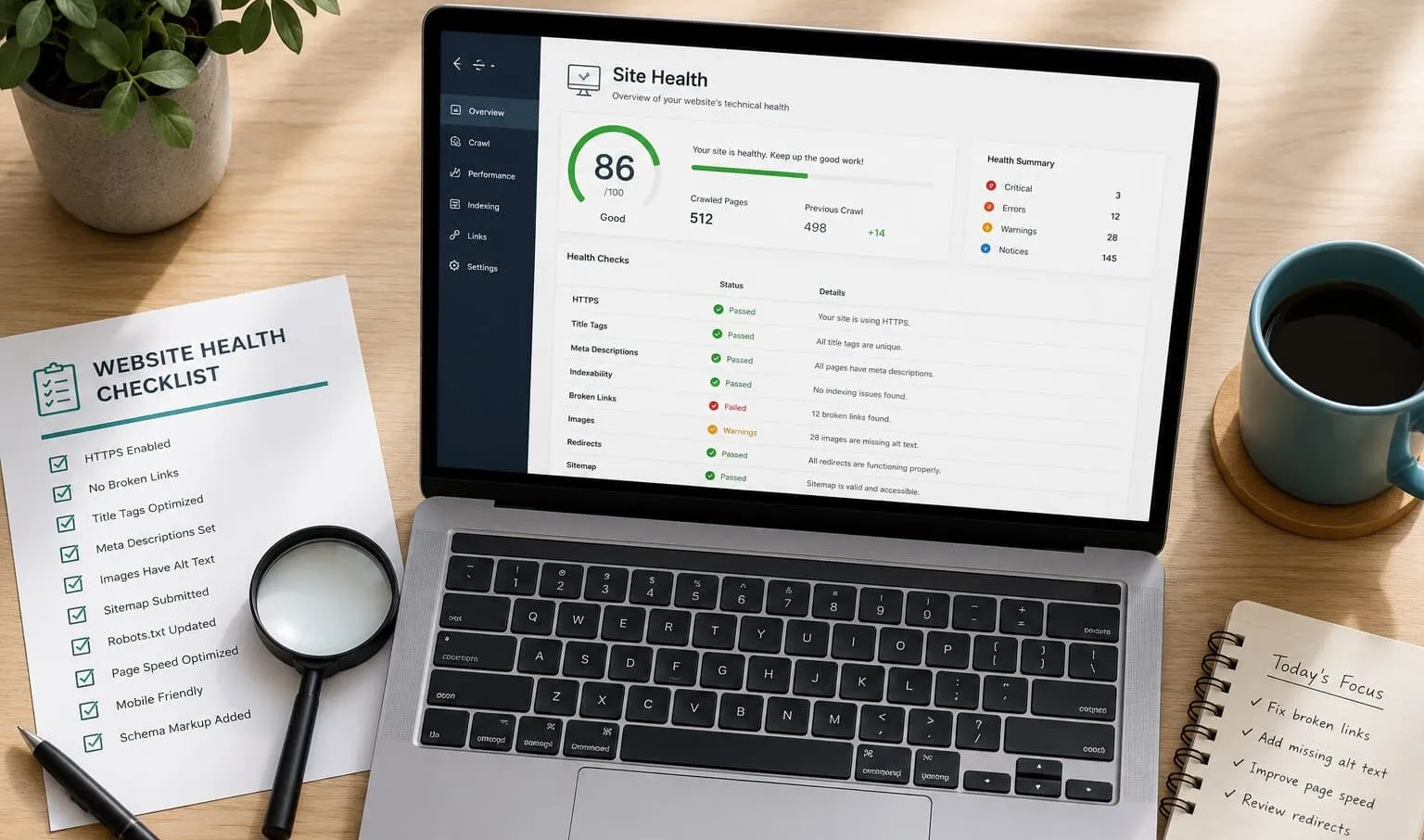
What technical SEO is and why it matters for rankings
So what is technical SEO, in plain terms? It’s the work that makes sure search engines can access, read, and store your pages without friction. Content tells Google what your page is about. Technical SEO determines whether Google can read that content in the first place. If a crawler can’t reach a page, or hits an error, your writing quality is irrelevant.
Here’s the mechanism most people miss. Google discovers a URL, sends a crawler to fetch it, and renders the page, including any JavaScript. Then it decides whether to add the page to its index. Each of those steps can break. A blocked resource stops rendering. A stray noindex tag stops indexation. A slow server times out the crawl. Every break costs you organic traffic you never see reported, because the traffic simply never arrives. If you want to understand exactly how these bots behave, Google’s documentation on crawling and indexing breaks down each step in detail.
This matters more now than five years ago because Google’s ranking systems increasingly reward page experience alongside relevance. Google’s own Search Essentials documentation lays out the technical requirements a page must meet before it’s even eligible to rank well. Miss those, and you’re competing with one hand tied.
Many assume technical SEO is a one-time setup. In reality, algorithm updates, CMS changes, plugin conflicts, and redesigns constantly introduce new issues. A site that passed every check last year can quietly develop crawl errors after a theme update. That’s why the checklist below is a recurring habit, not a launch-day task. Get the foundation right, and every piece of content you publish afterward has a fair chance to compete.
The core pillars of technical SEO explained
Technical SEO breaks into a handful of pillars that build on each other. Understanding them as a system, rather than a random list of fixes, separates a useful SEO audit from busywork.
- Crawlability: Can search engine bots reach your pages? This depends on your robots.txt file, internal linking, and server response time. If bots can’t get in, nothing else matters.
- Indexation: Once crawled, does Google actually store the page? Noindex tags, canonical tags, and duplicate content decide this.
- Site architecture and url structure: How your pages connect and how deep they sit in the hierarchy affects how quickly and thoroughly Google explores your site.
- Site speed and Core Web Vitals: Loading performance is a direct ranking input, not a nicety.
- Mobile-first indexing: Google evaluates the mobile version of your site as the primary version.
- Structured data: Schema markup helps search engines understand context and can earn rich results.
- HTTPS security: Encryption is a baseline trust and ranking signal.
When these pillars work together, the effect compounds. A fast, well-structured, crawlable site gets explored more completely, indexed faster, and surfaced more often. They compound because Google allocates finite crawl resources per site, so every efficiency gain in one pillar frees up capacity for the others. When one pillar fails, it drags the rest down. A brilliant site architecture means little if your server is too slow for crawlers to finish the job.
To see how Google’s own systems weigh these factors, read the Google Search Central blog. It documents changes to crawling, indexing, and ranking as they roll out. Reading it occasionally beats reacting to traffic drops after the fact. Treat these pillars as your audit’s table of contents, and the rest of this checklist becomes a lot less overwhelming.
Essential tools to set up before you start (Search Console, Analytics, audit tools)
You can’t fix what you can’t see. Before running any checks, set up your measurement stack, because a technical SEO checklist without data is guesswork.
Start with these three, none of which cost anything:
- Google Search Console: This is your direct line to how Google sees your site. It reports index coverage, crawl errors, mobile usability, Core Web Vitals, and which queries bring you clicks. Verify your property first; everything else builds on it.
- Google Analytics: Track how organic traffic behaves once it lands: which pages convert, where users drop off, and whether technical fixes actually improve engagement.
- A crawler like Screaming Frog: Its free tier crawls up to 500 URLs and surfaces broken links, redirect chains, missing titles, duplicate content, and noindex tags across your whole site at once.
Add PageSpeed Insights and Lighthouse (built into Chrome DevTools) for page speed and Core Web Vitals diagnostics. That combination handles the vast majority of what a small business site needs. If you’d rather not install anything, a free on-page SEO analyzer tool can surface many of the same issues straight from your browser.
Paid tools like Ahrefs and Semrush add scale, historical tracking, and automated issue prioritization, but skip them for your first pass. The root cause of most wasted budget here is buying software before understanding the problem. A five-page site does not need a $200-per-month subscription to find its issues.
If setting up and interpreting these tools feels like a wall, that’s exactly the kind of groundwork a hands-on technical SEO audit from Vineet Kukreti covers. It connects the data to specific fixes rather than handing you a raw report. The goal isn’t more dashboards. It’s knowing which numbers actually point to a problem worth fixing.
Crawlability and indexation: how search engines find your pages
Crawlability and indexation are different, and confusing them is where many small sites lose visibility. Crawlability is whether Googlebot can reach and fetch your page. Indexation is whether Google decides to store it and make it eligible to rank. A page can be perfectly crawlable and still never get indexed.
Here’s how the process runs. Google finds a URL through your XML sitemap, internal linking, or external links. It queues the URL, crawls it when resources allow, then renders it, executing any JavaScript rendering needed to see the final content. Only then does it evaluate the page for indexation. Break any link in that chain, and the page falls out of search.
Open Google Search Console’s Pages report to see the truth of your situation. Watch the “Discovered, currently not indexed” and “Crawled, currently not indexed” statuses closely. They mean Google knows the page exists but chose not to store it, usually because of thin content, duplicate content, or low internal linking signals pointing to it.
Common crawlability and indexation blockers to check:
- A `noindex` tag left on a page or template after staging
- Pages blocked in the robots.txt file that shouldn’t be
- Orphan pages with no internal links pointing to them
- Crawl errors and broken status codes eating your crawl budget
- Slow server response time causing crawls to time out
Indexation lags on new sites because Google allocates crawl budget based on perceived importance, and a brand-new domain has no track record telling Google its pages are worth prioritizing. Strong internal linking and a clean sitemap tell Google a page deserves attention. Fix the plumbing here and pages start appearing in the index within days rather than never.
XML sitemaps and robots.txt fundamentals
These two small files control a huge amount of what search engines do on your site, and they’re where beginners most often shoot themselves in the foot.
An XML sitemap lists the URLs you want Google to crawl and index. It doesn’t force indexation, but it helps Google discover pages faster, especially deep pages or newly published ones. Your sitemap should include only canonical, indexable pages that return a 200 status code. A sitemap stuffed with redirects, 404s, or noindex pages sends mixed signals and wastes crawl budget.
Rules of thumb for a clean XML sitemap:
- Include only pages you actually want ranked
- Exclude noindex pages, redirects, and error pages
- Submit it directly in Google Search Console
- Keep it updated automatically (most CMS platforms and SEO plugins handle this)
The robots.txt file does the opposite job: it tells crawlers where they may not go. This is where the catastrophic mistakes happen. A single `Disallow: /` line blocks your entire site. Many assume robots.txt controls indexing. In reality, it only controls crawling. A page blocked in robots.txt can still get indexed without its content if other sites link to it, showing up in search results as a blank, useless listing.
The safe pattern: use robots.txt to keep crawlers out of admin areas, cart pages, and internal search results. Use a noindex meta tag (on a crawlable page) when you actually want something kept out of the index. Confusing the two tools is the root cause of countless “why did my traffic disappear” cases. After any site change, open your robots.txt at yourdomain.com/robots.txt and read it line by line. Thirty seconds there can save months of lost organic traffic.
Site architecture, URL structure, and internal linking
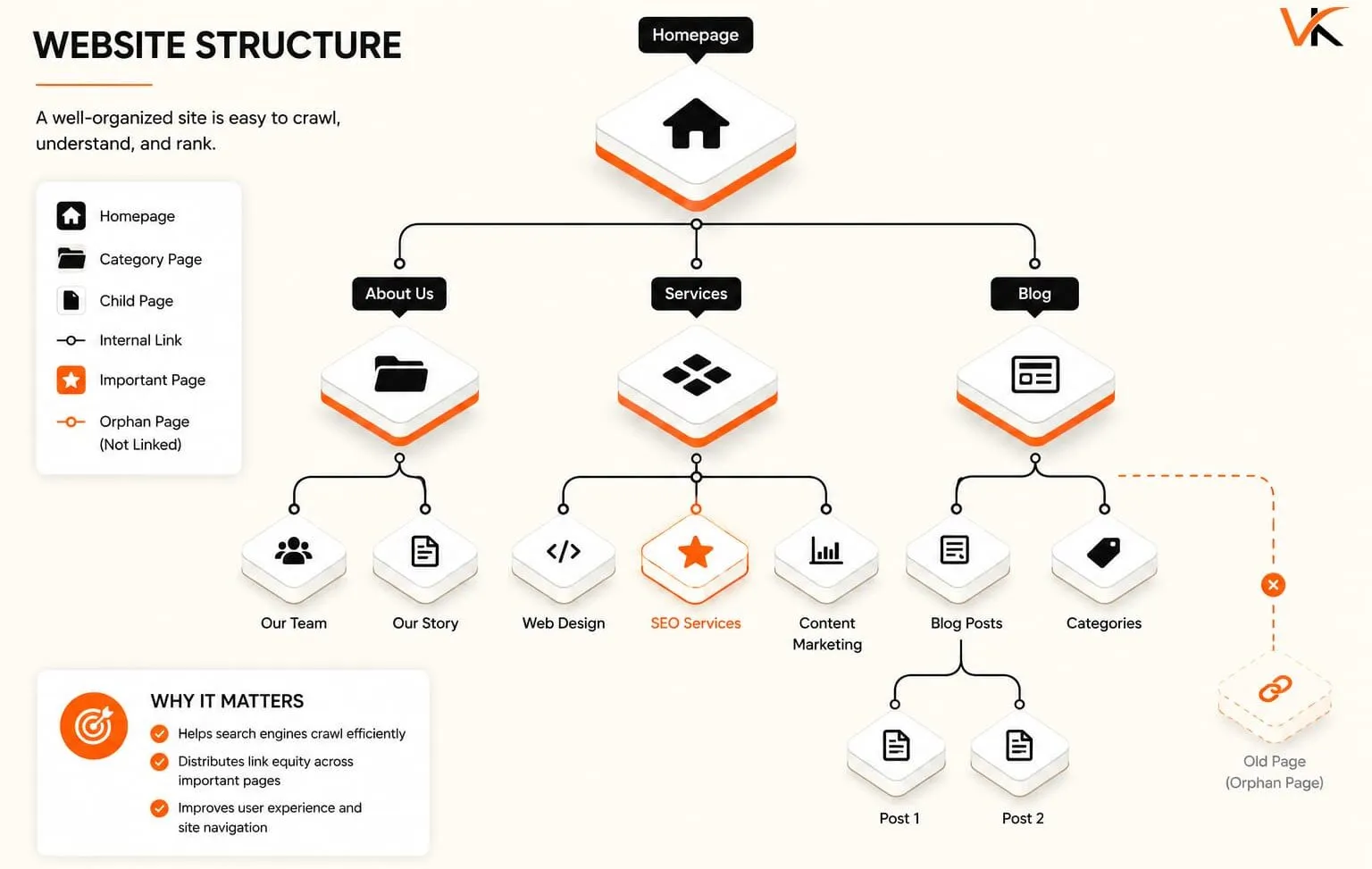
Site architecture is the shape of your website: how pages are grouped, how deep they sit, and how they connect. Get it right, and both users and crawlers move through your site efficiently. Get it wrong and important pages get buried where nobody, human or bot, ever finds them.
The working rule is the three-click depth guideline: any important page should be reachable within about three clicks from the homepage. Pages buried five or six levels deep signal low priority to Google and get crawled less often. Flatter, logically grouped site architecture and URL structure keep your money pages close to the surface.
Your URL structure should be readable and descriptive. Compare `yoursite.com/services/local-seo` against `yoursite.com/?p=4821`. The first tells both users and crawlers exactly what the page is about. Keep URLs lowercase, hyphen-separated, short, and stable. Changing them later means setting up redirects and risking ranking loss.
Internal linking is the most undervalued lever on this list. Links between your own pages do three jobs at once:
- They help crawlers discover pages, supporting crawlability
- They pass ranking signals (link equity) from strong pages to weaker ones
- They guide users through logical journeys, improving website navigation and engagement
Picture a service business with a strong homepage but service pages that no internal link points to. Those pages sit orphaned, rarely crawled, barely ranking, while the homepage soaks up all the authority. Adding contextual internal links from relevant blog posts and the main navigation often lifts those pages within weeks. Link equity finally reaches them. Map your key pages, then make sure each one has multiple relevant internal links pointing to it.
Site speed and Core Web Vitals
Site speed stopped being optional the moment Google made Core Web Vitals a ranking signal. Slow pages don’t just annoy users; they lose eligibility against faster competitors targeting the same search intent.
Core Web Vitals measure three specific things about the real user experience:
- Largest Contentful Paint (LCP): loading speed; how fast the main content appears. Target under 2.5 seconds.
- Interaction to Next Paint (INP): responsiveness; how quickly the page reacts to a tap or click. Target under 200 milliseconds.
- Cumulative Layout Shift (CLS): visual stability; how much the layout jumps around while loading. Target under 0.1.
These sit inside the broader page experience signals Google uses, which is why page speed belongs on the technical checklist rather than being treated as later polish. For a deeper breakdown of how each metric is defined and measured, Google’s web. dev team guide to Core Web Vitals performance metrics is the authoritative reference.
What Usually Slows Down Small Business Websites
What actually drags most small business sites down is predictable:
- Unoptimized images: Image optimization (compression, correct sizing, modern formats like WebP) is usually the single biggest quick win.
- Slow server response time: Cheap shared hosting can add seconds before a page even starts loading. Better hosting or caching fixes this.
- Bloated plugins and scripts: Every extra tracking script and unused plugin adds weight.
- No caching: Caching serves pre-built pages instead of rebuilding them on every visit.
Run your key pages through PageSpeed Insights, which reports both lab data and real-world Core Web Vitals field data from actual visitors. Google uses the field data for ranking. A common misconception is that a high Lighthouse “score” equals good rankings. In reality, Google cares about the field data thresholds above, not the composite score. The score is a lab simulation on a controlled device, while real visitors hit your site on varied networks and phones, and Google ranks based on what those real visitors actually experience. Fix the specific failing metric, retest, and confirm the field data catches up over the following weeks.
Mobile-first optimization and mobile-friendliness
Google indexes and ranks your site based on its mobile version. Not the desktop version. This is mobile-first indexing, and it has been Google’s default for years. If your mobile experience is stripped down or broken, that weaker version is what determines your rankings, even for desktop searches.
The practical implication catches people off guard. Content hidden on mobile, images that don’t load on smaller screens, or navigation that collapses into something unusable all get judged as your primary site. A common mistake is serving less content to mobile users to “keep it clean,” which effectively hides that content from Google entirely.
To confirm your site is genuinely mobile-friendly, check these:
- Responsive design: The layout adapts to screen size rather than forcing horizontal scrolling or pinch-zooming.
- Readable text without zooming: Base font sizes around 16px and enough line spacing.
- Tap targets sized for fingers: Buttons and links spaced so people don’t fat-finger the wrong one.
- Content parity: The mobile version contains the same text, headings, and structured data as desktop.
- Fast mobile load: Mobile Core Web Vitals often lag desktop because of slower connections and less powerful devices, so test mobile specifically.
Google Search Console flags mobile usability issues directly, and PageSpeed Insights defaults to mobile testing for exactly this reason. The root cause of most mobile problems is a design built desktop-first and then squeezed down, rather than designed for the small screen from the start. Given that most searches now happen on phones, a fast, mobile-friendly experience isn’t a segment of your audience. It’s the majority of it.
HTTPS, security, and site accessibility
HTTPS security is the baseline. Google confirmed HTTPS as a ranking signal over a decade ago, and modern browsers now actively warn visitors away from unencrypted “Not Secure” pages. If your site still runs on HTTP, that’s the first fix, before any other item on this checklist.
Getting HTTPS right involves more than installing a certificate:
- Valid SSL/TLS certificate: Most hosts offer free certificates through Let’s Encrypt; there’s no reason to run without one.
- Force HTTPS everywhere: Redirect all HTTP URLs to their HTTPS versions with proper 301 status codes so you don’t split signals across two versions of the site.
- Fix mixed content: A secure page that loads an image or script over HTTP throws warnings and undermines the padlock. Update those internal references.
- One canonical version: Choose www or non-www, HTTPS only, and redirect everything else to it.
Beyond encryption, site accessibility overlaps heavily with technical SEO. Clean HTML, descriptive alt text on images, logical heading order, and keyboard-navigable menus help screen readers and search engine crawlers alike, because both parse structure the same way. This matters for rankings because Google can understand accessible markup more easily. A site that’s hard for assistive technology to read is usually hard for crawlers too.
Security and accessibility requirements can also carry legal weight depending on your industry and location. Data-handling and accessibility standards vary by jurisdiction, so if you collect customer information or operate in a regulated sector, confirm your obligations with a qualified professional rather than assuming an SSL certificate covers you. For search visibility, though, the technical bar is clear: encrypt everything, standardize on one version, and keep your markup clean.

Duplicate content, canonicals, redirects, and status codes
Duplicate content confuses search engines about which version of a page to rank, and the confusion usually costs you. When Google sees the same content at multiple URLs, it splits ranking signals across them or picks a version you didn’t intend. On e-commerce and CMS-driven sites, duplicates appear constantly: URL parameters, tag pages, printer-friendly versions, and www versus non-www variants.
Canonical tags
Canonical tags solve most of this. A canonical tag tells Google, “this is the master version; consolidate signals here.” Point every duplicate or near-duplicate at its preferred URL, and Google concentrates ranking authority on the one page you want to compete. A common error is pages canonicalizing to themselves incorrectly or, worse, an entire section pointing its canonical to the homepage, which quietly deindexes those pages.
Redirects
Redirects manage URLs that have moved or been removed:
- 301 (permanent): Use this when a page has moved for good. It passes almost all ranking signal to the new URL.
- 302 (temporary): Only for genuinely temporary moves; it doesn’t pass signal the same way.
- Avoid redirect chains: A URL redirecting to another that redirects again wastes crawl budget and slows users. Point redirects directly to the final destination.
Status codes
Status codes are the plumbing signals your server sends:
- 200: OK, the page loaded fine.
- 301/302: Redirects, as above.
- 404: Not found. A few are normal; many broken internal links pointing at 404s are a problem.
- 5xx: Server errors. These are urgent; they mean crawlers and users are hitting a dead server.
Picture an online store that renames its “sale” category and forgets the redirect. Every old link, internal and external, now lands on a 404, and the ranking signal those URLs earned over years evaporates instead of transferring to the new page. A single 301 would have carried that authority forward.
Crawl your site and export every non-200 status code. Fix broken internal links, clean up redirect chains, and confirm your canonical tags point where you intend. This unglamorous cleanup often recovers lost organic traffic faster than any content project, because it stops signals from leaking.
Structured data and schema markup basics
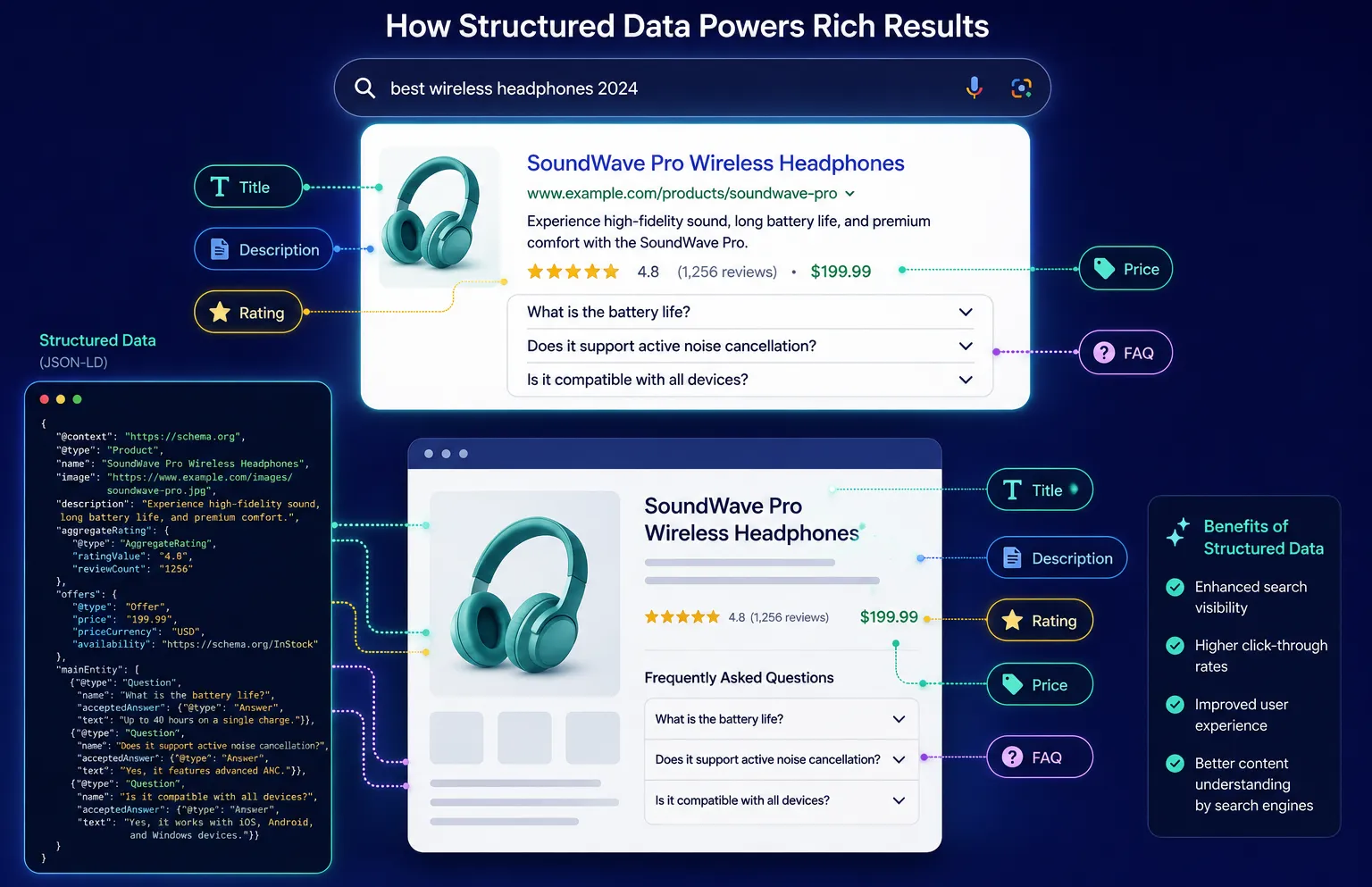
Structured data is code you add to a page that spells out what its content means in a language search engines parse directly. Instead of Google inferring that “4.8” near “reviews” is a rating, schema markup states it explicitly. The payoff is rich results: star ratings, FAQs, event dates, and product prices shown right in the search listing, which can lift click-through rates even when your position doesn’t change.
The most useful schema types for small businesses:
- Local Business: Name, address, phone, hours, and service area; essential for local search.
- Organization: Company details and logo, helping brand recognition in search.
- Product: Price, availability, and reviews for online stores.
- FAQ Page: Question-and-answer content that can expand directly in results.
- Article / Blog Posting: Author, publish date, and headline for content pages.
- Breadcrumb List: Reinforces your site architecture in the listing.
Schema is written in JSON-LD, which is Google’s recommended format. You don’t need to hand-code it: Vineet Kukreti’s free tool generates valid JSON-LD structured data you can paste into a page, removing the most common barrier for non-developers. After adding it, always validate with Google’s Rich Results Test to confirm it’s eligible.
A second reason to get structured data right is growing. As AI search visibility becomes a factor, clearly labeled, structured content is easier for AI-driven answer engines to extract and cite. Some site owners are experimenting with an llms.txt file to guide how large language models access their content, an early practice worth watching. Clean structured data helps both traditional rich results and this newer layer of AI search visibility, so it’s rarely wasted effort.
Which checks actually move rankings vs busywork (prioritization for small businesses)
Here’s the blunt truth: not every item on a technical SEO checklist deserves your Saturday. Some fixes recover real organic traffic. Others are perfectionism that no user or crawler will ever reward. For a small business with limited time, prioritization is everything.
Fix these first; they directly cost you rankings and traffic:
- Indexation blockers: A rogue noindex tag or a bad robots.txt line can hide your entire site. Highest priority, always.
- Broken pages and wrong redirects: 404s on important pages and canonical tags pointing to the wrong place leak signal daily.
- Failing Core Web Vitals on key pages: Fix your homepage and top landing pages before worrying about a blog post from three years ago.
- Mobile-friendliness: Since mobile-first indexing rules, a broken mobile experience undercuts everything.
- HTTPS: Non-negotiable baseline.
These matter, but only after the above:
- Structured data on priority pages
- Image optimization site-wide
- Internal linking improvements to buried pages
Know When Technical SEO Becomes Busywork
And here’s the honest part about busywork. Chasing a perfect 100 Lighthouse score, adding schema to pages nobody visits, or agonizing over URL parameters on low-value pages rarely moves the needle. The difference between technical SEO and content SEO effort is also worth weighing: once your foundation is solid and stable, further ranking gains usually come from content and relevance, not from squeezing another 50 milliseconds off a fast page. The distinction between technical SEO and content SEO matters here, because pouring more hours into a healthy technical base has diminishing returns. If you’d like a second opinion before committing your time, you can book a free SEO consultation to gut-check where your effort will pay off most.
Start with what blocks visibility. Confirm the fix in Google Search Console, then check behavior in Google Analytics. Then move to content and search intent, where the next real gains usually live. A technical SEO checklist earns its keep by clearing the path first, so the content you invest in afterward can actually rank.
Not Sure What to Fix First? Get a Prioritized SEO Review
If you’ve worked through this list and you’re not sure whether a slow page, a stray tag, or something in your content is holding back your rankings, a hands-on SEO audit can pinpoint exactly where the opportunities are being missed. Connect with Vineet Kukreti and get a clear, prioritized plan rather than another report you have to decode. Results vary based on competition, website condition, industry factors, and implementation, but knowing your real bottleneck is always the first step.
FAQs
Q1. What does a technical SEO checklist actually cover?
A1.
It covers the infrastructure that lets search engines crawl, render, index, and rank your site:robots.txt, XML sitemaps, HTTP status codes, canonical tags, site architecture, HTTPS, and Core Web Vitals. It deliberately excludes content strategy and link outreach, which fall under on-page SEO and off-page SEO.
Q2. How do I work through a technical SEO audit step by step?
A2.
Start by defining scope and goals (traffic loss, a migration, or a speed fix), then gather tools like Google Search Console, a crawler such as Screaming Frog or Sitebulb, and PageSpeed Insights. From there, check crawlability and indexing, review site architecture and internal linking, test page speed, and validate structured data before prioritizing fixes by severity.
Q3. What's the difference between technical SEO and on-page SEO?
A3.
Technical SEO is the foundation: server setup, site architecture, page speed, security, and how crawlers access your pages. On-page SEO is what lives on each page: content, headings, meta tags, keywords, and images, so the two work together rather than compete.
Q4. Is a technical SEO checklist worth it for a small business site?
A4.
If your pages aren’t being indexed or your site is slow, a checklist finds the exact blockers stopping visibility, so it’s worth it even for a five-page site. A misconfigured robots.txt or a stray noindex tag can quietly hide your whole site from Google, and no amount of content will fix that until it’s caught.
Q5. What if I already publish great content but still don't rank?
A5.
Excellent content can’t rank if search engines can’t crawl or render it, which is exactly what a technical audit uncovers. Common culprits include blocked resources, “Discovered, currently not indexed” pages in Search Console, and failing Core Web Vitals that drag down page experience.
Q6. Which tools do I need to run these checks myself?
A6.
The core free stack is Google Search Console, PageSpeed Insights, and Lighthouse or Chrome DevTools, paired with a crawler like Screaming Frog for site-wide issues. Paid tools such as Ahrefs or Semrush add scale, issue prioritization, and log-file analysis, but they aren’t required for a first pass on a smaller site.
Q7.
A7.
Q8. Why does technical SEO affect rankings at all?
A8.
Search engines must discover and render your pages before they can rank them, so blocked crawlers or missing sitemaps result in zero visibility. Google also uses Core Web Vitals- loading speed, interactivity, and visual stability- as ranking signals, which ties infrastructure directly to search performance.
Q9. How often should I actually re-run a technical SEO checklist?
A9.
Run a full audit quarterly, and always before and after a site migration or redesign, when issues most often appear. Between audits, monitor Search Console’s index coverage and Core Web Vitals reports monthly to catch new crawl or indexing errors early.

Vineet Kukreti is an experienced SEO and project management expert with over 10 years of success helping small businesses grow. He has led SEO campaigns that improved Google rankings, increased website traffic, and strengthened local visibility. As a project manager, Vineet brings structure and efficiency to digital operations, ensuring smooth execution and measurable results. His combined expertise in SEO and business operations makes him a trusted partner for growth-focused businesses.