

A local HVAC company hired a freelancer for a “simple website,” agreed everything over text messages, and three months later, the invoice was double the quoted amount. Nobody had written down that the booking system and the blog were separate jobs. That story repeats every week, and it’s almost always avoidable. Knowing how to scope a website project for small business is the cheapest insurance against blown budgets and missed launch dates. It also stops the resentment that builds when expectations quietly drift. This guide walks through defining objectives, listing deliverables, controlling scope creep, budgeting realistically, and folding SEO into the plan before a single page gets designed.

What project scope means for a website project
Project scope is the boundary around your website project: what gets built, what doesn’t, and the goals the finished site must serve. It’s not a wish list. It’s a decision about where the money and time go, written down so nobody has to remember a verbal promise later.
For a small business website, the scope covers pages, features, integrations, and exclusions. It should also name the objectives. A site built for lead generation looks different from one built for credibility alone. The Project Management Institute defines scope as the work required to deliver a product with the specified features.
Without a defined scope, every conversation reopens decisions you thought were closed. A clear project scope statement ends that. It gives the designer something to price against and gives you something to hold them to. Traffic alone isn’t enough. The scope is where you decide what the website is supposed to achieve in the first place. If you’ve watched a build spiral before, it’s worth understanding why website projects fail for small businesses so you can design the scope to avoid those exact traps.
Defining project objectives and goals
Vague goals produce vague websites. “We want a modern site” tells a developer nothing about whether the homepage should push a phone call, a quote form, or an online purchase. Sharp project objectives do.
Write goals you can measure. “Increase quote requests by 20% within six months of launch” is a project objective. “Look professional” is a feeling. The measurable version drives real decisions about page layout, calls to action, and which content gets priority. It also gives you a way to judge the website project after launch, rather than arguing about taste.
Tie every objective to a business outcome. If the goal is qualified leads, the scope should prioritize service pages, trust signals, and a fast path to contact. Google’s Search Central documentation is clear that helpful, purpose-built pages serve users better than generic filler. Note that business planning and contract rules vary by jurisdiction, so check the guidance that applies where you operate rather than assuming one set of rules fits everywhere.
Your objectives quietly dictate your web design decisions, your content strategy, and your budget. Get them fuzzy, and every later decision inherits that fog. Many owners assume the goal is “more traffic.” In reality, the goal is better business outcomes, and the scope should say so. If you’re unsure how to frame those goals, you can book a free SEO consultation to pin down objectives that actually tie to business outcomes.
Understanding and preventing scope creep
Scope creep is the gradual expansion of a website project after the scope of work has been agreed. It rarely arrives as one big demand. It shows up as “while we’re at it, can we add a blog,” then a booking calendar, then a members area. Each one is small. Each one is unbudgeted.
The root cause is almost always the same: features agreed verbally and never written into the project scope statement. When it’s not on paper, both sides remember it differently. The person who blinks first eats the cost or the delay. That’s how a $2,000 build becomes a $4,500 dispute. There’s solid thinking in the Harvard Business Review on managing project scope creep that reinforces just how quickly small, unbudgeted additions compound.
You prevent scope creep by making the scope specific enough that additions are obvious. If the scope of work lists exactly five pages and one contact form, a sixth page is clearly a change, not an assumption. Scope exclusions do the heavy lifting here. Naming what’s *not* included in the scope document- content writing, logo design, ongoing maintenance- removes the grey zone where creep lives. Managing expectations early is cheaper than renegotiating mid-build. A signed scope of work is the reference everyone returns to when memory fails.

Identifying deliverables and milestones
Project deliverables are the tangible things you receive: specific pages, a working contact form, a configured content management system, an integrated payment gateway. List them by name. “A website” is not a deliverable. “Home, About, Services, three location pages, a contact form, and Google Analytics installed” is.
Break the build into key milestones so progress is visible, and payment can be tied to completion. A typical sequence: approved sitemap and information architecture, design mockups, development, content population, testing, website launch. Each milestone is a checkpoint where you confirm the work matches the scope before the next phase starts.
Milestones protect both sides. They stop a project that’s 90% done for 2 months, with no clear finish line. They also let you catch problems early, when fixing them is cheap. Tie your deliverables to those key milestones in the scope document, and attach a rough project timeline to each. This is the backbone of website project management services: clear deliverables, clear checkpoints, and a shared understanding of what “done” means at every stage.
Getting client buy-in, approval and sign-off
If the person who signs the invoice hasn’t approved the scope, you don’t have a scope. You have a draft. The most expensive mistake in small business website projects is starting work while a silent decision-maker still has opinions nobody has heard: a business partner, a spouse, a franchise head office.
Get written stakeholder approval before any build work begins. Every person who can say “I don’t like this” reviews the project scope statement. They sign off on the deliverables, exclusions, budget, and timeline. A signed contract that references the scope of work turns opinions into agreed decisions.
Sign-off isn’t a one-time event either. Build it into your key milestones. Once the design mockups are complete, obtain explicit stakeholder approval before development begins. When development is done, get approval before launch. Without staged sign-offs, someone surfaces a major objection after the site is built. Now you’re paying to redo work everyone technically approved by staying quiet. Managing expectations means making approval an active, documented step rather than an assumed one.
Breaking the project into tasks and categories
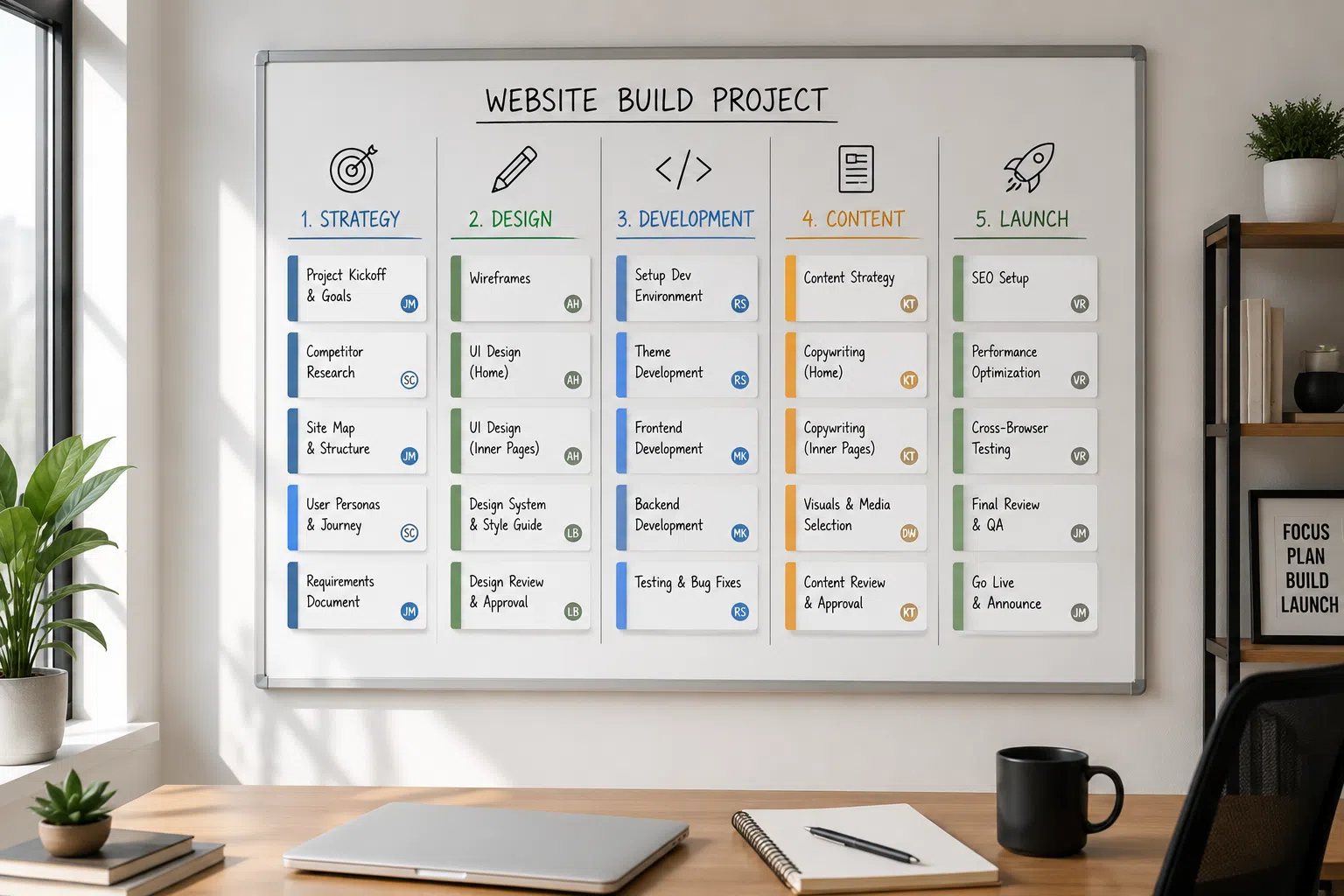
Once the deliverables are locked, break them into project tasks grouped by category. This turns an intimidating “build a website” into a list you can actually schedule, assign, and price. Vague scope hides work. A task breakdown exposes it.
Group tasks into logical buckets:
- Strategy and planning: sitemap, information architecture, content strategy, project requirements gathering
- Design: wireframes, homepage mockup, interior page templates, mobile layouts
- Development: CMS setup, page builds, forms, integrations, responsive testing
- Content: copywriting, image sourcing, page population
- Launch and SEO: technical SEO setup, analytics, redirects, final QA
Each category becomes a section of your resource plan and feeds directly into the project timeline. It also clarifies who owns what. If content writing sits under a category the client is handling, that belongs in your scope exclusions so nobody assumes the developer is writing it. Accessibility belongs here too; building in line with the Web Accessibility Initiative standards early is far cheaper than retrofitting compliant markup after launch.
This is where project planning gets practical. A list of project tasks organized by category lets you estimate hours honestly and spot dependencies. Design has to finish before development starts. You give a client a realistic picture instead of a guess. The clearer the tasks, the harder it is for scope creep to sneak in under the guise of “just a small thing.” This kind of structure is also exactly what makes project management for time-poor small business owners manageable, since the plan does the heavy lifting instead of your calendar.
Estimating times, costs, and budgeting
Your website budget follows directly from the scope, not the other way around. Page count, functionality, and content ownership are the three biggest cost drivers. A five-page informational site and a fifty-product e-commerce store are not the same project. Pretending they cost the same is how quotes go wrong. These are the project constraints that shape every estimate.
For time estimating, use your task breakdown. Assign hours per task, add a buffer for revisions, and map it against the project timeline. Costs vary by industry, competition, and how much content you supply yourself, so treat any figure as a starting range, not a fixed price. What many businesses overlook is that the cost to build a website barely matters if the site never generates leads. Budget for the outcome. A slightly larger website budget that includes proper setup usually returns more than the cheapest possible quote.
Change control and handling adjustments
Changes will happen. Requirements shift, a competitor launches something, the owner sees a site they love. A clear creative brief and scope don’t ban changes. They channel them through a change-control process so they become decisions rather than surprises on the invoice.
The mechanism is simple. Any request outside the agreed scope of work is documented as a change request. You assess the added cost and the impact on the project timeline. The client approves it, and only then does the work proceed. Nothing new gets built on a verbal “sure, add that.” That single rule kills most scope creep before it starts.
A change control process protects the relationship as much as the budget. When a client asks for an extra feature, you can calmly say “that’s a change, here’s the cost and the new timeline.” You’ve removed the awkwardness and the guesswork. If your site’s stalled traffic or an aging platform is driving these mid-project requests, Vineet Kukreti offers website project management that keeps changes documented and priced so your original launch date doesn’t quietly slip. Managing expectations through a formal process beats renegotiating from frustration.
Integrating SEO requirements into the website scope
Most small-business websites bolt on SEO after launch, then wonder why search visibility never arrives. That’s backward. SEO integration is within scope from day one. The site’s structure, URLs, and information architecture are far cheaper to build correctly than to retrofit. There’s a full breakdown of how to integrate SEO into website development that explains why the foundation matters more than any post-launch fix.
Explicitly include technical SEO in your project requirements. That means clean URL structure, mobile responsiveness, and fast loading. Website performance is a ranking and conversion factor. Add proper heading structure, indexable pages, and analytics installed before launch. If these aren’t in the scope of work, expect them to be skipped, and then billed later as extra. A pre-launch SEO checklist for new websites is the simplest way to make sure none of these items quietly fall off before you go live.
A beautiful website that Google can’t understand generates no qualified leads. Strong web design paired with SEO integration also shapes your content strategy, since pages should target real search intent, not just look nice. Many owners assume “we have a website” means Google will send visitors. In reality, without technical SEO and deliberate optimization, the site stays invisible. If search visibility is a real goal, Vineet Kukreti provides website development with SEO integration so technical foundations and content are built in from the start rather than patched on after the fact.

Scoping a website redesign vs a new build
A website redesign and a new build share a lot, but the scope of work is different. Treating a redesign like a fresh start wastes money. With a redesign, you already have data: existing pages, current rankings, backlinks, and traffic patterns. Ignoring that data is how businesses tank their search visibility on relaunch.
For a redesign, the scope must include a preservation audit. Which URLs earn traffic and qualified leads today? What needs 301 redirects to protect existing rankings? What content already performs and should carry over? A redesign scope that skips redirect mapping is the classic cause of a post-launch traffic collapse: sites that “look better” and rank nowhere.
A new build has no legacy to protect, so the scope leans more on information architecture, content creation, and getting the foundation right the first time. Both need clear deliverables, key milestones, a creative brief, and a change control process. A redesign carries risk in what you might lose. A new build carries risk in what you forget to include. Scope each one for its actual situation, not a generic checklist.
Knowing how to properly scope a website project for a small business is mostly about writing decisions down before money changes hands. If your current site has stalled traffic, or you’re planning a redesign and want to protect what already ranks, a short strategy conversation with Vineet Kukreti can map out a scope that protects your budget and search visibility before the build begins. The goal isn’t a prettier website. It’s a plan that turns into real business outcomes.
FAQs
Q1. How do I scope a website project for my small business?
A1.
Start by defining measurable goals (like increasing quote requests by 20% in six months), then map your target audience, required pages, and functionality before setting a budget and timeline. Scoping simply means writing down what the website must do, what it won’t include, and who it’s for so everyone works from the same plan.
Q2. What are the 5 steps to defining a project scope?
A2.
The core steps are: set clear objectives, identify your target audience, list deliverables (pages, features, integrations), state exclusions, and lock in a budget and timeline. Documenting all five in a single scope document keeps the project aligned and prevents mid-build confusion.
Q3. What questions should I ask before starting a website project?
A3.
Ask what the primary goal is (leads, sales, credibility), who the audience is, what action visitors should take, and what content and functionality you actually need. Answering these first turns vague ideas into a scope a designer can price and build against.
Q4. How do I stop scope creep from blowing up my website budget?
A4.
Write a detailed scope that states what’s included and excluded, involve every decision-maker before work starts, and require a written change request for anything new. Most scope creep comes from features agreed verbally mid-project, so a documented change process protects both your budget and your launch date.
Q5. What if my requirements change halfway through the build?
A5.
Changes are normal, which is why a good scope includes a change-request process rather than banning changes outright. You document the new request, agree the added cost and timeline impact, and continue, so the change is a decision, not a surprise on the invoice.

Vineet Kukreti is an experienced SEO and project management expert with over 10 years of success helping small businesses grow. He has led SEO campaigns that improved Google rankings, increased website traffic, and strengthened local visibility. As a project manager, Vineet brings structure and efficiency to digital operations, ensuring smooth execution and measurable results. His combined expertise in SEO and business operations makes him a trusted partner for growth-focused businesses.