

A new website goes live on a Monday. By Friday, organic traffic has dropped. The site looks great. Nobody set up redirects from the old URLs. This is a costly mistake in website project management, and it happens because the project treated SEO as a finishing touch instead of a starting requirement. This guide walks through how web development projects actually run, from discovery to launch and beyond, and where things tend to break.

What website project management is and why it matters
What is website project management? It’s the discipline of planning, coordinating, and controlling every part of building or rebuilding a website. The goal is a launch that’s on time, on budget, and actually does its job, which for most businesses means generating leads. It covers the full arc: project planning and discovery, design and development, testing and deployment, website launch, and maintenance and support.
Here’s what many business owners overlook. A web project isn’t a design task with a developer attached. It’s a coordination problem. You have project stakeholders with different priorities, content that lives in three different inboxes, a developer waiting on assets, and an SEO strategy that nobody owns. The root cause of most failed projects isn’t bad code. It’s the absence of a website project manager tracking how the pieces connect. If this sounds like your situation already, it may be time to hire a freelance website project manager before scope and SEO issues compound further.
This matters because of cost. According to the Project Management Institute, poor requirements management is one of the primary reasons projects miss their goals. In fact, project success rates can improve with structured management, a pattern PMI has documented across industries, not just web builds. On a website, unclear requirements show up as rework, blown timelines, and a launch that quietly tanks your search visibility. Good website project management keeps the business outcome, not just the build, in view the entire time.
Key phases of the website project lifecycle (planning to launch)
Every web project moves through the same core stages, whether it’s a five-page small business website or a 200-page platform. Skipping or rushing any one of them creates problems downstream.
The typical lifecycle looks like this:
- Project planning and discovery: define project scope, goals, project stakeholders, and project deliverables.
- Design: wireframes and visual design, usually in Figma.
- Content: writing, assets, and on-page SEO elements.
- Design and development: turning approved designs into working pages.
- Testing and quality assurance: catching bugs, broken links, and performance issues.
- Deployment and website launch: going live with redirects and tracking in place.
- Maintenance and support: ongoing updates and monitoring.
The order matters more than people think. The Nielsen Norman Group has long documented that decisions made early in a project are often cheaper to change than those made late. Moving a navigation item during wireframing costs minutes. Moving it after launch costs development hours plus the risk of breaking internal links. A clear website project management plan, built around sound project management methodologies, sequences these phases so each one feeds the next instead of forcing expensive backtracking.
Project planning and discovery: scope, stakeholders, deliverables
This is the phase that decides whether the rest of the project runs smoothly or turns into a fire drill. During project planning and discovery, you gather information, set goals, and define exactly what you’re building and why.
Three things need to be nailed down here:
- Project scope: the specific pages, features, and functionality included, and just as importantly, what’s excluded.
- Project stakeholders: who approves what, who provides content, and who has final sign-off.
- Project deliverables: the concrete outputs, from the Figma files to the migrated content to the live site.
What actually happens when discovery is skipped: project scope stays vague, so every new request feels reasonable. “Can we add a booking form?” “What about a blog?” Each addition seems small. Together they can push the timeline out by weeks and the budget past its limit. This is scope creep, and it’s a quiet killer of web projects.
A practical move is to define roles and responsibilities in writing. When a stakeholder knows they own homepage copy and it’s due by a specific date, the project keeps moving. When ownership is fuzzy, work stalls while everyone assumes someone else has it. Discovery is also where SEO requirements belong: URL structure, target search intent, and content hierarchy should be settled before a single design mockup is approved. It’s also worth confirming accessibility expectations now, since the W3C web accessibility guidelines are often easier to meet when they’re built into wireframes rather than retrofitted later.

Setting goals, budgets, and realistic timelines
A website without a defined goal is just an expense. Before anything else, decide what the site should do: generate qualified leads, support local search visibility, sell products, or reduce support calls. That goal shapes every later decision.
Budget and timeline flow from scope, not the other way around. A common mistake is picking a launch date first, then trying to cram the real scope into it. The result is cut corners, usually on testing and SEO, since these are the least visible and easiest to drop under pressure.
For a realistic estimate, break the project into phases and assign time to each:
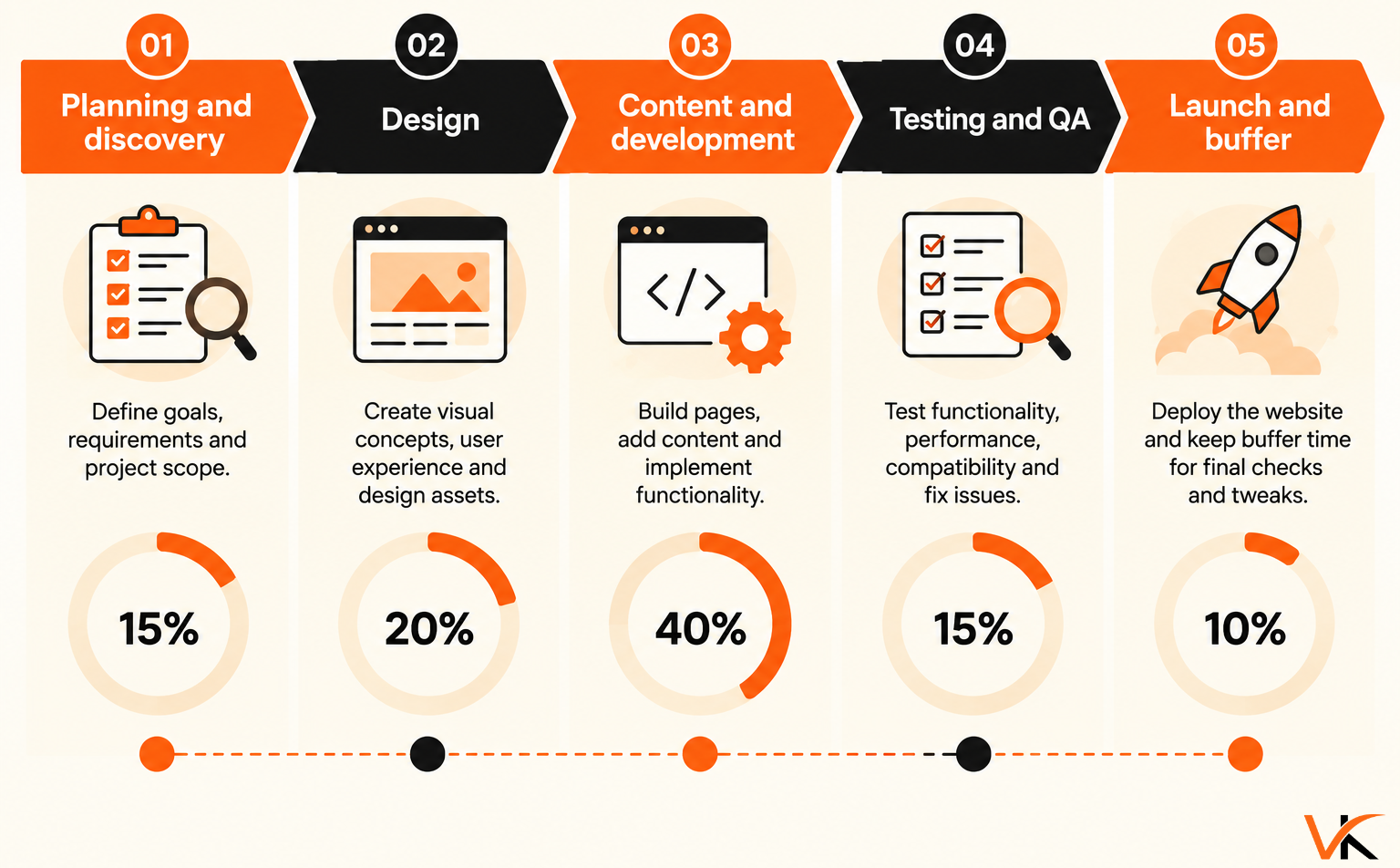
Build in a buffer. Content delays are a common reason small business website projects slip, because copy and images sit with the client while the developer waits. The budget should account for this too: hourly models, like Figma-to-launch builds priced per hour, keep costs tied to actual work rather than padded fixed quotes. Vineet Kukreti works as a website project manager offering this service at $35/hour from Figma to launch, which suits small businesses that want predictable, work-based pricing without agency overhead.
Design and development stage with a single source of truth
Once scope and goals are locked, design and development begin. Design produces wireframes and visual mockups, usually in Figma. Development turns those approved designs into functioning pages. The handoff between these stages is where mistakes multiply without a shared reference point.
That reference point is your single source of truth: one place where the current design files, approved copy, feature requirements, and decisions live. When the design sits in Figma, the copy sits in a Google Doc, and feedback sits in email threads, developers build from outdated information. Every version mismatch then becomes rework that eats the budget.
A single source of truth also protects the project timeline. When a stakeholder asks, “Did we approve this layout?”, the answer is one click away instead of a 20-message thread. Project management software, used properly, serves this role by linking tasks, files, and approvals together. For additional website project management tools and resources, you can also explore Vineet Kukreti’s tools to support planning, execution, and project management.
During development, SEO elements need to be built in, not deferred. Page titles, heading structure, schema markup, and clean URL patterns are part of the build, not a later task. Working from a technical SEO checklist for new site launches during this stage keeps these details from falling through the cracks. A site that reaches the end of design and development with no SEO foundation will likely need retrofitting, and some of it, like URL structure, is painful to change after launch.
Testing, quality assurance, and deployment
Testing and deployment are where a project either lands cleanly or breaks in public. Quality assurance isn’t just clicking around to see if the site “works.” It’s a structured check against the requirements defined in discovery.
A real QA pass covers:
- Functionality: forms submit, links work, interactive elements behave.
- Cross-browser and device testing: the site holds up on mobile, which is where much of small business traffic now lands.
- Performance: page speed, since slow pages can hurt both conversions and search visibility.
- Technical SEO: redirects mapped, meta tags present, schema valid, sitemap and robots file correct.
- Analytics: tracking fires before launch, not after.
Many assume testing and deployment is just the final box to tick. In reality, it’s where the SEO work done earlier gets verified or exposed. A damaging launch failure is missing redirects. When old URLs change without 301 redirects to their new equivalents, you can lose the ranking equity those pages earned, and recovery can take time.
Deployment should follow a checklist, not a vibe. Confirm redirects, run a final crawl, verify analytics, then push live. A controlled website launch with a rollback plan beats a rushed one. Quality assurance done right is cheap insurance against an expensive post-launch scramble.

Maintenance, updates, and project closure after launch
Launch is a milestone, not the finish line. The first few weeks after going live are when real-world issues surface: a form that fails on a specific browser, a page indexed with the wrong title, a redirect that missed an edge case. Maintenance and support cover this ongoing work.
Project closure is a step most small businesses skip, and it can cost them. Closure means formally wrapping the project: confirming all deliverables were met, documenting what was built, handing over credentials and files, and noting any open items for future work. Without it, knowledge lives in one person’s head, and the next update turns into a guessing game.
Ongoing maintenance and support includes:
- Monitoring search visibility and organic traffic for drops after launch.
- Applying security and platform updates (critical for WordPress sites).
- Fixing bugs and broken links as they appear.
- Reviewing performance against the goals set in discovery.
Post-launch monitoring matters because search engines take time to recrawl and reindex a changed site. A ranking problem can show up a few weeks after launch, not on day one. Catching it early can be the difference between a quick fix and a lost quarter. If traffic flattens out after launch, it helps to know how to improve SEO when a website stalls rather than guessing at fixes. Treat the post-launch window as part of the project, not an afterthought, and build it into the budget from the start.
Tracking progress, communication, and stakeholder reporting
A project can be technically on track and still feel like it’s failing, simply because nobody knows what’s happening. Clear stakeholder communication is what separates a calm project from an anxious one.
To track progress effectively, a website project manager needs visibility into three things: what’s done, what’s in progress, and what’s blocked. Project management software gives you this at a glance and acts as the single source of truth for status. Regular status reports, even a short weekly summary, keep stakeholders informed without requiring a meeting for every update.
Good stakeholder communication has a rhythm:
- Weekly status reports: progress, upcoming work, and anything blocked.
- Milestone reviews: sign-offs at the end of each major phase.
- Risk flags: raised early, not when they’ve already caused a delay.
Transparency matters here because it builds trust. When a client can see what’s being worked on and why, they tend to stop asking for constant check-ins and start trusting the process. That’s also where the critical path comes in: knowing which tasks, if delayed, push the whole project back lets you report the timeline honestly instead of discovering slippage too late. Reporting isn’t busywork. It’s how you catch project risks while they’re still small.
Common website project risks and how to avoid failure
Most web project failures aren’t dramatic. They’re slow accumulations of avoidable mistakes. Knowing the common project risks lets you plan around them before they bite.
The recurring ones:
- Scope creep: the project grows feature by feature until the budget and timeline collapse. Prevent it with a documented project scope and a change-request process.
- Content delays: a frequent timeline killer for small business website projects. Prevent it by assigning content owners and deadlines in discovery.
- No SEO plan: the site launches with broken redirects and missing schema, risking search visibility. Prevent it by treating technical SEO as a build requirement.
- Unclear roles and responsibilities: work stalls while everyone assumes someone else owns it. Prevent it by writing down who does what.
- Weak communication: problems hide until they’re expensive. Prevent it with regular status reports.
Picture a retailer that redesigns its site to look more modern but skips redirect mapping and schema carryover. Within a month, product pages that used to rank fall off the first page. Organic traffic drops, and the business starts spending on ads to replace leads it used to get for free. The redesign “succeeded” visually and struggled commercially.
The common thread in every one of these risks is the same: a gap in ownership. Website project management exists to close those gaps.

Integrating SEO from the start of a website project
A major lever in website project management is treating SEO as a design input, not a post-launch cleanup. A beautiful site that search engines can’t understand, or that abandons its old URL structure, can underperform no matter how good it looks.
Integrating SEO from the start means these decisions happen during project planning and discovery:
- URL structure: clean, logical, and mapped from old to new before anything moves.
- Search intent: each page matched to what users are actually searching for.
- Technical SEO: schema markup, crawlability, and site speed built into development.
- Content hierarchy: headings and internal linking planned, not improvised.
Here’s the mechanism behind the common redesign disaster: search engines assign ranking value to specific URLs over time. Change those URLs without 301 redirects, and that value may not transfer. It can evaporate. That’s why a redesign can affect search visibility even when the new site is objectively better. The fix isn’t complicated. It’s redirect mapping done before launch, whether the team works in scrum sprints, kanban boards, or a straight waterfall sequence.
This is also why a web project benefits from someone who understands both project management and SEO. A pure web development team ships what it’s told to ship. An SEO-aware website project manager, which is exactly what Vineet Kukreti brings to Figma to launch website project management, works to keep search visibility intact through the transition rather than rebuilding it from zero afterward. If you want a second opinion on your current setup before committing to a rebuild, you can also book an SEO consultation to see where the gaps actually are.
If your next website project involves a redesign or migration, the best time to protect your search visibility is before design starts, not after traffic drops. Book a strategy call with Vineet Kukreti to review your scope and SEO requirements before anything gets built. It’s a short conversation that can help protect your organic traffic.
FAQs
Q1. What is the 80/20 rule for project managers?
A1.
It means 20% of tasks, like scope definition, stakeholder sign-off, and critical-path dependencies, drive 80% of a project’s outcomes. In website projects, that 20% is usually the SEO and content requirements defined before design starts, not the visual polish added at the end.
Q2. What are the 7 stages of web development?
A2.
The typical sequence is planning, design (wireframes/Figma), content creation, development, testing, launch, and post-launch maintenance. SEO decisions, URL structure, schema, and redirects need to be locked in during planning and design, not bolted on after testing.
Q3. Can a small business just hire a web developer instead of a project manager?
A3.
Developers build what they’re told; they generally don’t track whether page titles match search intent or whether old URLs get redirected. Without someone managing the project end to end, these gaps surface after launch as traffic drops.
Q4. How long does a typical small business website project take from design to launch?
A4.
Most small business sites take 4 to 10 weeks from Figma design approval to launch, depending on page count and content readiness. Delays usually come from unclear scope or content that isn’t finished on time, not from development itself.

Vineet Kukreti is an experienced SEO and project management expert with over 10 years of success helping small businesses grow. He has led SEO campaigns that improved Google rankings, increased website traffic, and strengthened local visibility. As a project manager, Vineet brings structure and efficiency to digital operations, ensuring smooth execution and measurable results. His combined expertise in SEO and business operations makes him a trusted partner for growth-focused businesses.